What Growing My Manhole Is
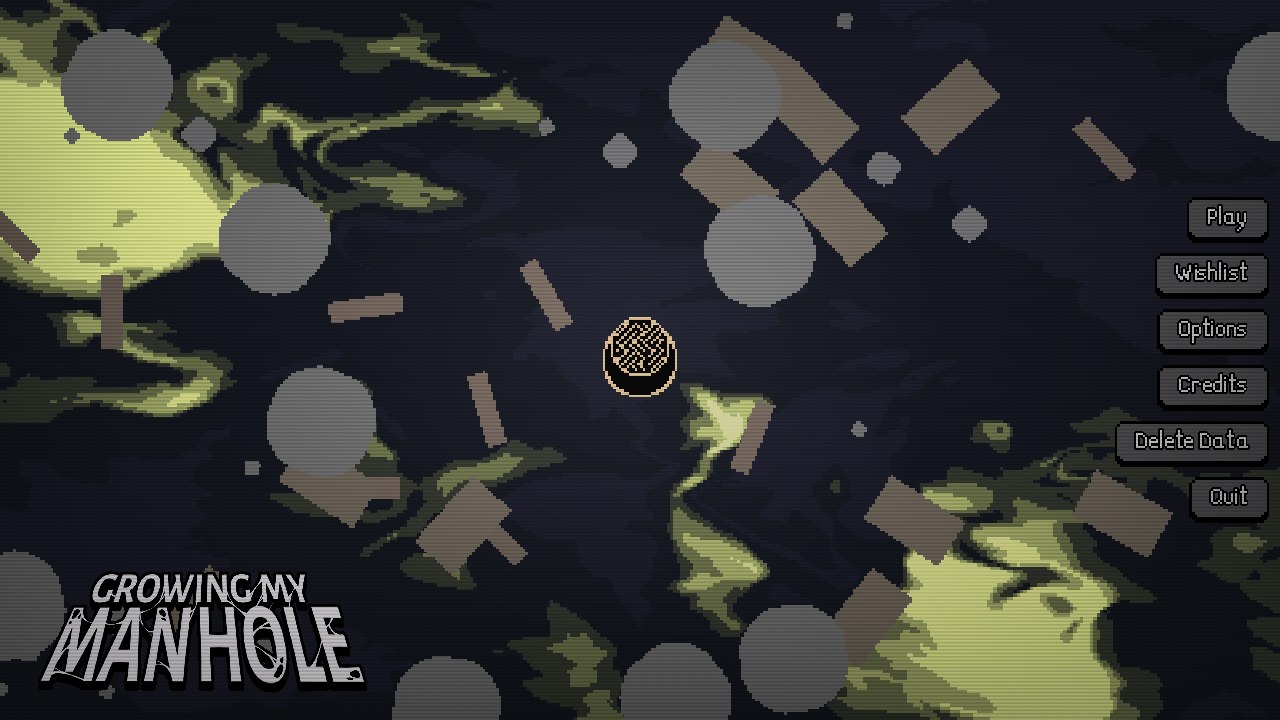
Growing My Manhole is an early incremental demo by SylverDev, built with Godot. The active character is a black circular hole with a white rim. Pointer movement steers it across a top-down field, where overlapping small objects cause the hole to consume them, earn money, and fill its Size progress bar.
The demo is organized into active collection stages and between-stage decisions. Hunger falls during a stage. When it is depleted, the game opens a results boundary that reports collected object types and earnings, then offers the upgrade tree and continuation options.
The first-party page also describes a planned full version with more object tiers, zones, powerups, and modes. Those plans are useful context, not a checklist of content guaranteed in this build. This guide separates observed demo behavior from future scope and avoids exact formulas that were not readable.
How Growing My Manhole Works
- Move the pointer to steer the hole through clusters of objects small enough for the current size. The player does not click each item individually and no keyboard movement was observed.
- Watch money, Size progress, and Hunger together. Consumption pays currency and advances growth, while the hunger bar limits how long the active collection phase can continue.
- Use larger size states to consume larger object classes. SIZE UP! and boost overlays mark visible transitions, but their exact numerical thresholds and durations were not measured.
- At the stage summary, inspect earnings and purchase only upgrades whose tooltip is readable. Continue to the next area or stage when the build makes that option available.
Controls
- Pointer steering: Move the mouse or pointer to steer the central hole across the field and line it up with consumable objects.
- Interface clicks: Click upgrade nodes, continuation buttons, and other visible interface controls between collection phases.
Growth, Hunger, and Upgrade Systems
Money and consumption
Consumed objects disappear and generate value popups. Stage reports total earnings, which funds purchases in the upgrade tree.
Size progression
The Size bar fills through consumption. Higher size states visibly allow cars, buildings, and other larger object classes to enter the collection loop.
Hunger boundary
Hunger limits the active phase. Hunger Depleted opens a report without erasing the earnings used for upgrades, while TOO HUNGRY TO CONTINUE appears as an additional progression gate.
Readable respawn upgrade
One reviewed tooltip explicitly says Increase objects respawn rate and shows a $60 price. That wording is the only branch effect this guide names as confirmed.
Unknown upgrade branches
The other upgrade branch meanings remain unknown or unidentified because their icons are visible but their tooltips were not readable enough to transcribe.
Demo versus planned scope
Late footage reaches much larger object fields, but it does not prove that all 25 announced tiers, all five planned zones, or every future mode exists in the demo.
Growing My Manhole Incremental Demo Systems Guide
Based on the first-party demo description, local Godot export, and reviewed frames showing pointer-guided collection, the readable respawn tooltip, Hunger Depleted report, and late large-object field.

Guide Overview
A complete demo cycle is active: steer, consume, earn money, fill Size progress, manage Hunger, read the stage report, and choose an upgrade. Each resource answers a different question about what the hole can do next.
The upgrade tree invites overinterpretation because many icons are visible. This guide names the object respawn-rate node whose tooltip is readable and leaves every other branch effect unknown until equivalent evidence exists.
1. Steer through currently consumable objects
Move the pointer and let the hole follow it across the top-down field. Aim through clusters of small objects that disappear on overlap. Value popups and the Size bar confirm successful consumption.
The hole does not visibly pull distant objects, and the player is not clicking each piece. Efficient movement comes from drawing a route through compatible targets rather than chasing one item at a time.
Warning: Do not describe keyboard movement, click-to-eat input, or passive collection.
2. Separate money, Size, and Hunger decisions
Money funds the branching upgrade tree. Size progress changes which object classes can be consumed. Hunger limits the duration of the active field. Reading them as one generic growth meter hides why a stage stalls.
When SIZE UP! appears, test larger nearby objects while preserving enough route space to continue collecting. When Hunger is low, prioritize reachable value instead of crossing the field for an uncertain target.
Warning: Do not publish exact thresholds, durations, or earning formulas.
3. Use the stage report as the reinvestment point
Hunger Depleted ends the collection phase and opens a report with stage information, object counts, total earnings, and upgrade or continuation actions. The money survives into this decision screen, so depletion is part of the incremental structure rather than simple death.
TOO HUNGRY TO CONTINUE appears as a separate gate in reviewed play. When the build blocks continuation, return to the available upgrade and stage choices instead of assuming the session has been erased.
Warning: Do not call every hunger boundary game over.
4. Buy only the upgrade effect you can read
One expanded node clearly states Increase objects respawn rate and shows a $60 cost. That upgrade can be discussed because its effect is visible in text, even though the precise before-and-after values are too small to quote.
Other branches show dependencies and distinct icons, but their meanings remain unidentified. A disciplined guide preserves that uncertainty rather than naming movement, time, economy, or boost effects from appearance alone.
Warning: Do not label the other upgrade branches without a readable tooltip.
5. Distinguish demo escalation from promised scope
Later stages visibly include cars, buildings, stars, and dense large-scale debris, with reviewed play reaching size states in the low teens. This proves meaningful escalation within the demo.
The public plan for 25 object tiers, five zones, more powerups, and additional modes belongs to the planned full version. It does not prove that each item is available in the mirrored demo or that the reviewed final report is a narrative ending.
Warning: Do not present the future feature list as current demo content.
Common Demo Mistakes
- Do not describe the hole as growing passively. The verified loop depends on active pointer steering and object consumption.
- Do not chase objects too large for the current state. Use the visible size feedback to prioritize items the hole can already consume.
- Do not assign effects to upgrade icons from color or shape. Buy based on readable tooltip text and leave the other branch effects unidentified.
- Treat Hunger Depleted as a stage boundary, not a conventional death screen. The results and upgrade choices are part of the intended incremental cycle.
Browser Notes
The embedded game is a Godot HTML5 demo. Click the player before steering so pointer movement reaches the canvas.
Late stages become visually dense. Performance can vary by device, and source material includes a photosensitivity warning for intense effects; reduce exposure if flashing or dense motion is uncomfortable.
Keyboard controls, touch quality, persistence, fullscreen behavior, and pause-on-blur were not verified for this build.
Game Credits
- SylverDev - developer and author
- Godot - engine listed for the public build
Credits & Fan Site Disclaimer
This is an unofficial fan-operated page created for game information, discussion, and independently reviewed demo guidance.
Growing My Manhole and its original game assets belong to SylverDev and the respective rights holders. This website is not affiliated with, endorsed by, or sponsored by the game's creator.
Growing My Manhole FAQ
How do you move in Growing My Manhole?
Move the pointer to steer the hole. Click interface buttons and upgrade nodes between active collection phases.
What do money, Size, and Hunger do?
Consumption earns money and fills Size progress. Hunger limits the current active stage and leads to a results and upgrade boundary when depleted.
Which upgrade effect is confirmed?
A readable tooltip says Increase objects respawn rate. The other upgrade branch meanings remain unidentified in the reviewed evidence.
Does the demo contain every planned feature?
No such claim is supported. The planned full version lists more tiers, zones, powerups, and modes than can be confirmed in the current demo.
Is this the official site?
No. This is an unofficial fan-operated page with independently reviewed demo analysis.