What CIFI Ouroboros Helper Tool Is
CIFI Ouroboros Helper Tool is an in-development community utility by SirRed for players of the separate idle game CIFI. The current public release is v0.03.02 and describes two available functions: Ship Install Optimizer and Borge's Build Simulator. The local Unity wrapper still reports an internal product version of 0.001, but that stale package field must not replace the creator's current public version.
The strongest current instructions concern the Ship Install Optimizer. The creator says its comparison defaults to Cells and can weight MP in red, Shards in blue, or RP in orange. Meltdown can be set to 1.0 for earlier progression, while CAS is an internal comparison score. These labels explain how to frame a calculation; they do not disclose the implementation formula or guarantee that the proposed install arrangement is globally optimal.
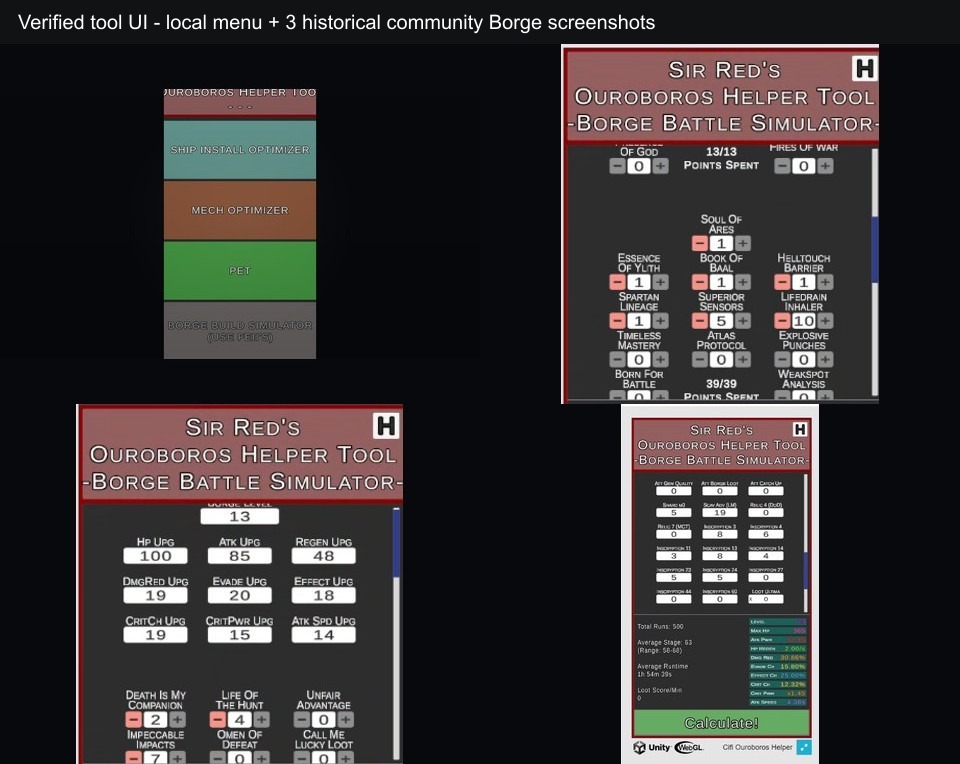
The analysis image also contains three historical Borge interface screenshots posted by a community user roughly two years before this review. SirRed replied to that thread about one displayed field, supporting the screenshots as genuine historical tool states. They remain historical evidence, however, and should not be presented as a verified match for the current public version v0.03.02.
How the Helper Workflow Works
- Open the helper beside the CIFI state you intend to evaluate. Read each requested value from the same current game state rather than combining numbers copied from different runs or progression stages.
- Choose Ship Install Optimizer for the currently documented optimizer workflow. Enter the values requested by the interface, then set Meltdown. The creator specifically documents 1.0 as an earlier-progression setting, not as a universal recommendation.
- Select the output emphasis that matches the resource you are comparing. Cells is the default; MP, Shards, and RP are optional colored weights. A result produced under one emphasis should not be described as best for every resource goal.
- Run the calculation and compare the proposed install arrangement or CAS output with the inputs you supplied. Record which weighting was active so a later comparison remains interpretable.
- Treat Borge screenshots as a historical workflow reference only. The old interface shows level and upgrade inputs, point allocation, a Calculate! command, and result metrics, but current field names and behavior were not directly verified.
Controls
- Pointer or touch: Use the Unity interface buttons, numeric fields, toggles, plus or minus controls where present, and calculation commands. No keyboard shortcut set was verified.
- Fullscreen: The wrapper exposes a fullscreen button for the narrow 450 by 800 canvas. Mobile layout fills the browser area, but detailed touch ergonomics were not measured.
Verified Modules and Evidence Boundaries
Ship Install Optimizer
This is a currently described function. It accepts the tool's requested CIFI values, a Meltdown setting, and output weighting before producing an install comparison.
Cells, MP, Shards, and RP weights
Cells is the default output focus. MP is represented in red, Shards in blue, and RP in orange. These are goal weights, not claims that all four resources can be maximized simultaneously.
CAS
The creator describes CAS as an internal comparison score. Without a published formula, it should be used to compare results inside the tool rather than converted into an external CIFI rule.
Historical Borge UI
Older screenshots show Borge Level, owned or current upgrade values, plus and minus allocation, Points Spent, Total Runs, Calculate!, average stage or range or runtime, loot score per minute, and combat output. Their current applicability is limited.
Mech Optimizer
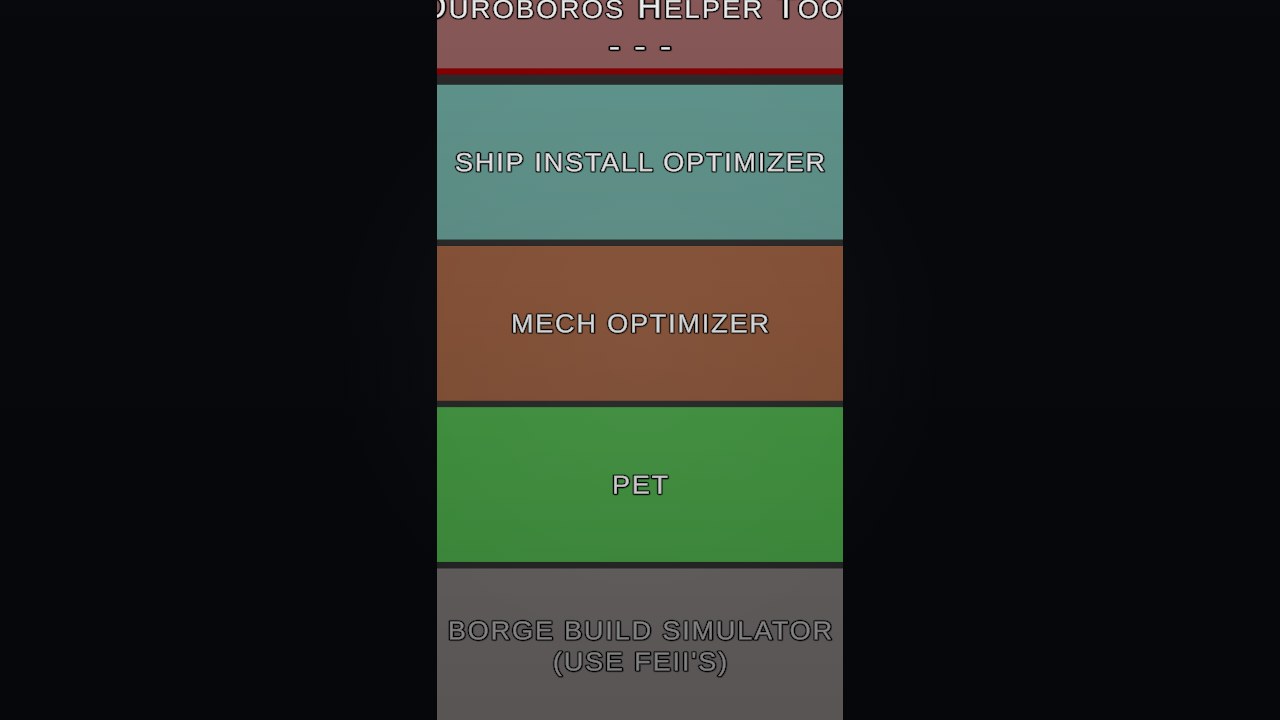
Mech Optimizer is a menu-visible entry in the local home screen. The public description does not list it as an available current function, so this page does not provide a workflow or claim it works.
Pet
Pet is another visible menu entry only. No reviewed input screen, output, or creator instruction establishes a functioning Pet module.
No verified transfer workflow
No reset, persistence, clipboard, copy-and-paste, import/export, or save-transfer process was visible in the reviewed states. Re-enter values when necessary instead of relying on an undocumented feature.
CIFI Ouroboros Helper Tool Workflow Guide
Based on SirRed's current v0.03.02 description, the local Unity menu, and three historical Borge screenshots with a creator reply. Current Ship instructions and historical Borge UI are kept separate.
Guide Overview
A useful helper session begins with a defined comparison question. Decide whether the Ship output should emphasize Cells, MP, Shards, or RP, collect one coherent set of current values, and preserve the selected weight when recording the result.
Borge follows a different evidence standard. The old screenshots can explain what a past calculation session looked like, but they cannot establish current buttons, defaults, formulas, or compatibility. Use that section as interface literacy rather than current-version operating instructions.
1. Define the Ship comparison before entering values
Open the main CIFI state you want to evaluate and decide which output resource matters for this comparison. Cells is the helper's default framing, while MP, Shards, and RP can be selected as alternate weights.
Write down the chosen emphasis and the progression context. That note prevents a later Cells-oriented result from being compared as though it came from an RP-oriented calculation.
Warning: The available documentation does not establish a single weight that is correct for every account or objective.
2. Enter one coherent current state
Read each requested value from the same main-game state and enter it into the Ship Install Optimizer. Avoid mixing a present Ship value with an older screenshot, planned upgrade, or another player's late-game setup.
Set Meltdown with the same care. SirRed specifically notes that 1.0 can be used earlier in progression, which is a bounded usage note rather than proof that 1.0 should remain selected at every stage.
Warning: Do not fill unknown fields with guessed values merely to make the calculator run; the output would compare a state that does not exist.
3. Calculate and record the context of the output
Run the optimizer after the inputs and weight are set. Read the proposed install arrangement and any CAS comparison in relation to the active goal. CAS is described as an internal comparison score, so it is useful within the tool without being translated into an undocumented external formula.
For a meaningful second run, change one deliberate factor: the resource emphasis, Meltdown setting, or one updated current value. Record the before and after state so you know what caused the comparison to move.
Warning: A higher internal score under one weighting is not a guaranteed globally optimal CIFI build.
4. Read the historical Borge interface cautiously
The older screenshots show a Borge Level input, many named upgrades, plus and minus allocation controls, Points Spent, Total Runs, and a Calculate! command. Result screens report averages such as stage, range, runtime, loot score per minute, and visible combat output values.
Those controls establish a historical workflow: enter the old state, allocate points, choose the run count or related values, calculate, and inspect aggregate results. They do not establish that current public version v0.03.02 exposes the same fields or computes them identically.
Warning: Keep the word historical attached to the Borge screenshots whenever describing their workflow or metrics.
5. Stop at the menu-visible boundary
The local home screen contains Ship Install Optimizer, Mech Optimizer, Pet, and Borge Build Simulator (Use Fei's). The public description confirms current availability only for Ship and Borge.
Treat Mech Optimizer as a menu-visible entry and Pet as a menu-visible entry. Until a reviewed screen or creator instruction shows their inputs and outputs, there is no factual workflow to publish for either one.
Warning: Do not infer completed modules, import/export, persistence, reset, or clipboard features from navigation labels or project class names.
Workflow Mistakes to Avoid
- Do not mix current Ship documentation with the old Borge screenshots. They are separate evidence sets with different version confidence.
- Do not describe the output as guaranteed optimal. The helper compares the entered state under selected weights; its formula and global search guarantees are not published here.
- Do not create Mech or Pet instructions from menu labels. Visibility proves navigation text, not completed module behavior.
- Do not promise import/export or a reset button. Neither was verified in the current description, local menu, or historical screenshots.
- Do not copy another player's values without matching their progression context. A clean comparison starts with one coherent CIFI state and one declared resource emphasis.
Browser Notes
The helper is a Unity WebGL build with a narrow 450 by 800 canvas and a fullscreen control. It is also presented publicly for HTML5, Windows, and Android, supporting a pointer or touch-oriented interface rather than a gameplay keyboard scheme.
A 2026-07-20 browser smoke test reached the Unity main menu. This confirms startup only and does not confirm any module’s complete workflow, input handling, calculation behavior, or current-version output. Ship guidance still comes from creator documentation, while the Borge interface description remains explicitly historical.
Autosave, persistence, keyboard entry shortcuts, clipboard integration, reset behavior, and transfer between the browser and main CIFI save were not verified.
Game Credits
- SirRed / SirRed's Stuff - tool creator
- CIFI - separate idle game referenced by the helper creator
Credits & Fan Site Disclaimer
This is an unofficial fan-operated page created for tool information, discussion, and independently reviewed workflow guidance.
CIFI Ouroboros Helper Tool belongs to SirRed. CIFI is a separate game referenced by the creator, and this website is not affiliated with, endorsed by, or sponsored by either project or their rights holders.
CIFI Ouroboros Helper Tool FAQ
Which helper functions are currently documented?
The current public description lists Ship Install Optimizer and Borge's Build Simulator. Mech Optimizer and Pet are visible menu entries but are not verified as working modules.
What does the Ship Install Optimizer compare?
It uses the values requested by the tool, a Meltdown setting, and a selected Cells, MP, Shards, or RP emphasis to compare install results.
Is Meltdown 1.0 always the best setting?
No. The creator documents 1.0 for earlier progression. That note is context-specific and is not a universal optimum claim.
Does the analysis image show the current Borge interface?
Not necessarily. The Borge panels are historical community screenshots whose exact match to current public version v0.03.02 was not verified.
Can the helper import or export a CIFI save?
No import/export, clipboard, or save-transfer workflow was verified, so this page does not promise one.
Is this an official CIFI product page?
No. This is an unofficial fan-operated guide page, and the helper itself is described by its creator as a community tool for the separate game CIFI.